Blog
Bpexch Account Guide
How to Manage Your Bpexch Account
You need a Bpexch account to access the platform. To get an account, contact the support team on WhatsApp. They will guide you through setup and provide your login details once your account is ready. Keep your username and password safe, and contact the support team if you have any problems accessing your account.
What Is a Bpexch User Account?
A Bpexch account is your personal account that gives you access to the platform. You can use it to log in with your username and password, view available sports markets, check upcoming matches, and check other available features. Your account helps you access the platform and use the services linked to your account.
Bpexch uses a support-based account system, so you need to contact the support team on WhatsApp to create an account. Once your account is created, the support team will provide your login details. Keep your username and password private, and use them whenever you want to log in.
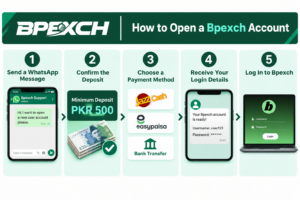
Steps to Open a Bpexch Account
- Send a WhatsApp Message: Start by sending a message to the Bpexch support team and ask for a new user account.
- Confirm the Deposit: The minimum deposit for a user account is PKR 500.
- Choose a Payment Method: Use JazzCash, Easypaisa, or bank transfer. Get the current payment details before sending money.
- Receive Your Login Details: Once your payment is confirmed and your account is ready, you will receive your username and password.
- Log In to Bpexch: Open the correct Bpexch website in Chrome, enter your login details, and access your account.
Quick Guide to Account Access
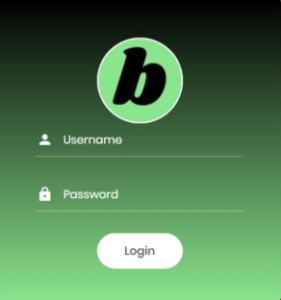
- Open the Website: Open Chrome on your mobile and enter the correct Bpexch website address.
- Enter Your Login Details: Type the username and password you received when your account was created.
- Check Your Details: Make sure there are no spelling mistakes or extra spaces in your login information.
- Log In: Tap the Login button to open your account.
If you cannot access your account, check your login details and internet connection first. For more help, read our Bpexch login guide.
Bpexch Account Details Guide
Your Bpexch account is linked to your login details and personal information. This may include your username and registered mobile number. These details help identify your account when you log in or need help with an account issue.
Always check that your account information is correct. If your name or mobile number is incorrect, ask the support team to update it. Keep your username and password safe, and never share your password with other people. If you have trouble accessing your account, ask the support team for help.
How to Update Your Bpexch Profile
If you need to update your personal details on Bpexch, first check which changes are allowed. Some updates may require help from the support team. For example, if you change your mobile number or need to correct your name, explain the issue through WhatsApp and follow their instructions.
Before requesting a change, make sure you provide the correct details. Do not create another account to fix an issue with your existing one. If you are unsure how to update your information, ask the support team for guidance.
Password Change Guide for Bpexch
A strong password helps protect your Bpexch account from unwanted access. Choose a password that is difficult for others to guess but easy for you to remember. Avoid simple passwords or personal details someone could easily guess.
For example, do not use:
- 123456 or other simple number patterns
- Your name or date of birth
- Your mobile number
- The same password you use for other accounts
Use a long, unique password with a mix of letters, numbers, and symbols if the platform allows them. Never share your password with other people. If you think someone else knows your password, contact the support team to ask how to secure your account. You cannot change your Bpexch password yourself. Contact the support team on WhatsApp to request a password change.
How Account Verification Works
Account verification helps confirm that you are the person using the account. If the support team asks you to confirm your details, provide correct information through a trusted contact channel. Before sharing any personal details, make sure you are speaking with the right support team. Do not share your password or other private login information for verification.
Bpexch Account Security Tips
Keeping your Bpexch account secure starts with a few simple habits. Protect your login details and be careful when opening the website or using your account.
- Keep your password private: Never share it with other people.
- Check website links: Make sure the website address is correct before entering your login details.
- Avoid suspicious links: Do not open unknown links sent through messages.
- Log out after use: Always log out if you access your account on someone else’s phone or computer.
- Protect your device: Use a screen lock on your mobile and keep your browser updated.
These steps can help reduce the risk of someone accessing your account without your permission.
Checking Your Login History and Activity
Your Bpexch account activity shows what happens in your account. You can check your login history to see when your account was accessed. You can also review your deposit and withdrawal records to see how much money you added to your account and how much you withdrew.
You can check your Bpexch transaction history to view your deposit and withdrawal amounts, payment dates, and transaction details. You can also download your transaction history to keep a record of your payments and review them whenever needed.
Check your account activity regularly to see your transactions. If you notice an unknown login or a transaction you did not make, contact the support team as soon as possible. Explain the problem and ask them to help secure your account.
Duplicate Account Rules on Bpexch
A duplicate account means having more than one account on the same platform. If you already have a Bpexch account but cannot access it, try to resolve the login issue before requesting another one.
Having multiple accounts may cause confusion or problems. If you created two accounts by mistake, explain the situation to the support team and ask them to close one.
How to Close Your Bpexch Account
To close your Bpexch account, contact the support team on WhatsApp and request account closure. You will need to provide your account ID or username so they can identify your account. Follow their instructions to complete the process. Make sure you check any pending deposits or withdrawals before closing your account.
How to Get Your Account Back
To reopen your Bpexch account, contact the support team on WhatsApp. Provide your account ID or username so they can find your account. The support team will guide you through the steps to reopen it. Once your account is active again, you can log in using your existing login details.
Common Account Issues and Fixes
You may sometimes face problems when logging in or using your Bpexch account. Some issues you can fix with a few simple checks, while others may require help from the support team. Here are some common problems and what you can do to solve them.
I. Login Not Working
If you cannot log in to your Bpexch account, first check your username and password. Make sure you have entered the correct details without extra spaces or typing mistakes. Also, check your internet connection and make sure you are on the correct website.
If the problem continues, contact the support team for help.
2. My Account Has Been Restricted
If your account is restricted, you may not be able to access some features. Contact the support team and ask why they restricted your account. Follow their instructions to understand what you need to do.
3. Unable to Open the Website
Sometimes, a website may not load because of a weak internet connection or a browser problem. Check your connection, refresh the page, and try opening the website again in Chrome. You can also update your browser if needed.
If the website still won’t open, ask the support team whether there is a temporary access issue.
4. Balance Not Updated After Deposit
If you have sent a deposit but your account balance has not updated, check your payment confirmation first. Keep your transaction ID and payment receipt ready. Then contact the support team and provide the payment details they need to check the transaction.
Avoid sending the same payment again until you have checked what happened to the first one.
5. My Withdrawal Is Delayed
If your withdrawal has not arrived, check its status and confirm that the receiving details you provided are correct. Withdrawal requests usually take 5–30 minutes to process. If your payment takes longer than 30 minutes, contact the support team on WhatsApp and ask for an update on your withdrawal.
For more details, read our complete guides on deposit and withdraw.
FAQ
1. How can I log in to my Bpexch account?
Open Chrome on your mobile, visit the correct Bpexch website, and enter the username and password.
2. Can I reset my Bpexch password by myself?
No, you cannot change your password yourself. Contact the support team on WhatsApp to request a password change.
3. How can I keep my Bpexch account safe?
Use a strong password, keep your login details private, and avoid suspicious links. Always check the website address before entering your account details.
4. What should I do if my Bpexch account is not working?
Check your internet connection and make sure your login details are correct. If the problem continues, contact the support team for help.
5. How much time does a Bpexch withdrawal take?
A withdrawal usually takes around 5–30 minutes.
Get Help With Your Bpexch Account
Managing your Bpexch account is easier when you keep your login details safe and regularly check your account activity. Always use the correct website and make sure your account information is accurate. If you have any problems with login, deposits, withdrawals, or other account issues, contact the support team on WhatsApp at 03047577777.